 RobertBeekman
edc7ec7705
- The constructors saved the path before setting it up, while it was
  still invalid, so a new path stored nothing and didn't follow its data
  model leaving and returning to the store until it was saved.
- Removing the dynamic child a path points to left the path valid and
  reading a default value, it now becomes invalid like when the child
  was never there.
- The stored type of a path is now also looked up in all loaded
  assemblies, Type.GetType only found it in Artemis.Core and the .NET
  libraries, not in plugins or SkiaSharp.
Artemis




Artemis adds highly configurable support for several games to a range of RGB keyboards, mice and headsets.
Check out our Wiki and more specifically, the getting started guide.
Pre-release download: https://artemis-rgb.com/
Plugin documentation: https://artemis-rgb.com/docs/
Please note that even though we have plugins for each brand supported by RGB.NET, they have not been thoroughly tested due to a lack of hardware. If you run into any issues please let us know on Discord.
A full list of supported devices can be found on the wiki here.
Want to build? Follow these instructions
- Create a central folder like
C:\Repos - Clone Artemis into
<central folder>\Artemis - Clone Artemis.Plugins master branch into
<central folder>\Artemis.Plugins - Open
<central folder>\Artemis\src\Artemis.slnand build as Debug - Open
<central folder>\Artemis.Plugins\src\Artemis.Plugins.slnand build as Debug
Alternatively in PowerShell
git clone https://github.com/Artemis-RGB/Artemis Artemis
git clone https://github.com/Artemis-RGB/Artemis.Plugins Artemis.Plugins
dotnet build .\Artemis\src\Artemis.sln
dotnet build .\Artemis.Plugins\src\Artemis.Plugins.sln
For an up-to-date overview of what's currently being worked on, see the Projects page
Plugin development
While Artemis 2 is still in development, the plugin API is pretty far along.
To get started, you can download the .NET templates, check out the Artemis.Plugins.Templates repository.
Due to the volatine nature of the project right now, there is no documentation yet. The templates provide some commentary to get you going and feel free to ask for more help in Discord.
Third party plugins
A few people have already started working on plugins! We're keeping a list on our wiki
https://wiki.artemis-rgb.com/en/guides/user/plugins
Work in progress screenshots
Note: Video tutorials and written guides on many of the features displayed below are planned for when Artemis 2 nears feature-completion.
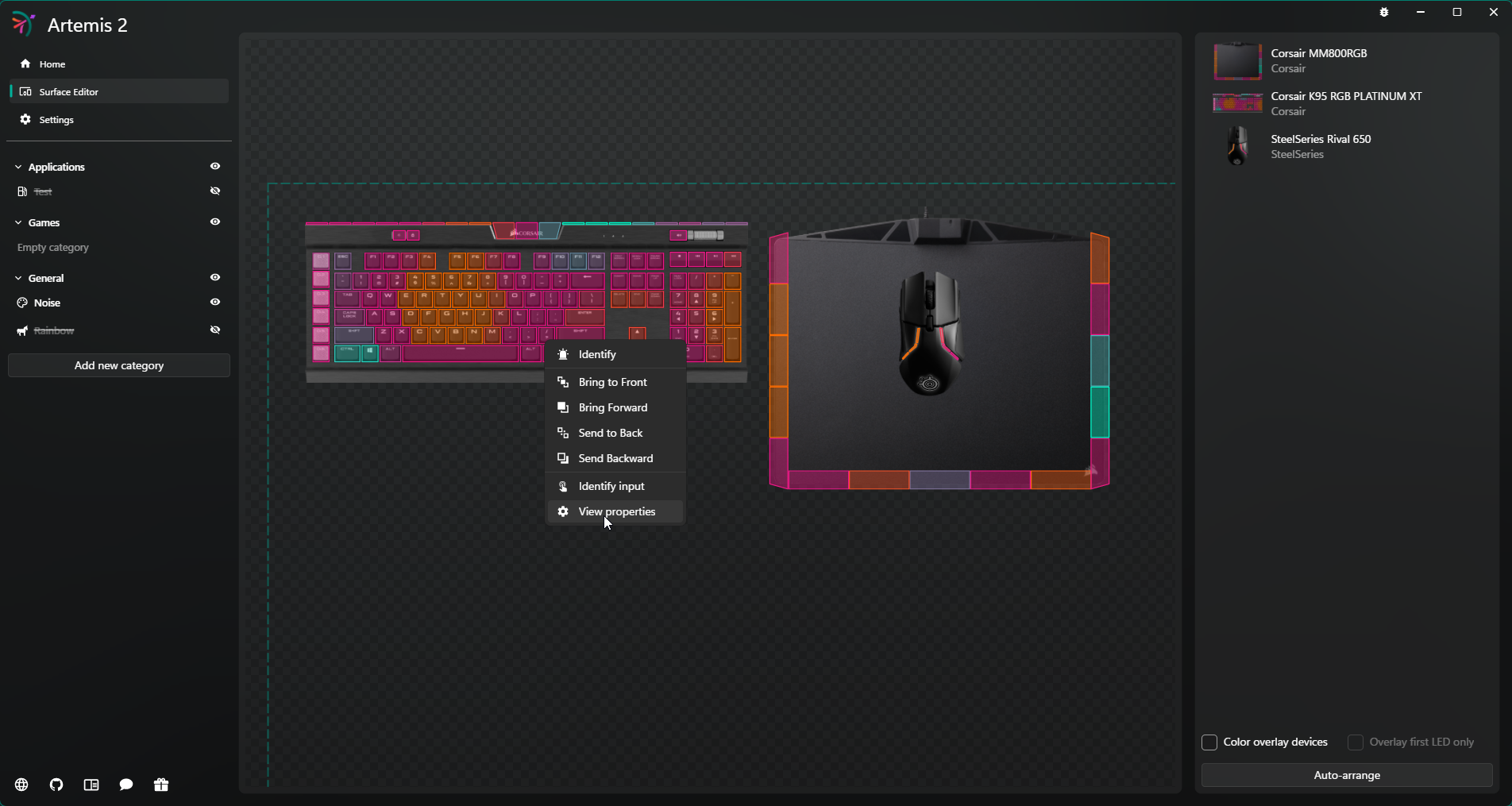 The surface editor allows you to recreate your desktop in 2D space, this provides Artemis with spatial awareness and ensures effects scale properly over your different devices. Right clicking a device lets you change its properties such as rotation and scale.
With the keyframe engine you can animate almost any property of the layer. In the example above the position and scale of the shape have been animated using keyframes.
For more screenshots check out the wiki: https://wiki.artemis-rgb.com/en/screenshots
Special thanks
Over the years several companies have supported Artemis by providing both hardware and software, thank you!

