 RobertBeekman
63186ee06d
* Profile adaption - Fix arrow keys section including Page Down

- The arrow keys keyboard section now starts at Arrow Up instead of the key before it (Page Down)
- Updated the keyboard section test to expect only the four arrow keys

* Color quantizer - Let fully saturated colors be vibrant and grays be muted

- The saturation limits of the color types are now inclusive, so 100% saturated colors count as vibrant and 0% saturated colors count as muted
- The lightness limits stay exclusive so pure black and white are still left out
- Updated the quantizer tests to match

* Color gradients - Fix stop placement, seamless toggling and list events

- Stops on an occupied position now move down 0.001 instead of 0.002 (rounding error in the distance check)
- Flip, rotate, spread and interpolate move all stops together, so a stop can take a position another stop is leaving
- Spreading or randomizing a single stop puts it at 0 instead of NaN
- ToggleSeamless does nothing on an empty gradient and caps stretched stops at 1 instead of 100
- RemoveAt reports the removed stop and its index
- Insert links the stop like Add does and raises the add before the move
- Remove, RemoveAt, Clear and replacing a stop through the indexer unlink and stop listening to the actual removed stop
- Copying from a list of stops sorts them by position
- Obsolete GetPositionsArray no longer skips the seamless positions, obsolete GetColor picks the right colors after a repeat
- Updated the gradient tests to match

* Core - Fix small color, enum, string and type utility bugs

- Darken keeps the alpha of the color
- GetAllValuesAndDescriptions(Type) uses the [Description] attribute like the generic version
- UrlFriendly cuts titles at 80 characters instead of 81
- RemapInternationalCharToAscii knows both cases of r, l, d, thorn, sharp s, h and j with accents
- IsGenericType returns false instead of throwing when the base type is not generic
- IsCastableFrom also finds conversion operators declared on the target type
- GetDisplayName keeps the brackets of array types when humanizing
- Updated the utility tests to match
Artemis




Artemis adds highly configurable support for several games to a range of RGB keyboards, mice and headsets.
Check out our Wiki and more specifically, the getting started guide.
Pre-release download: https://artemis-rgb.com/
Plugin documentation: https://artemis-rgb.com/docs/
Please note that even though we have plugins for each brand supported by RGB.NET, they have not been thoroughly tested due to a lack of hardware. If you run into any issues please let us know on Discord.
A full list of supported devices can be found on the wiki here.
Want to build? Follow these instructions
- Create a central folder like
C:\Repos - Clone Artemis into
<central folder>\Artemis - Clone Artemis.Plugins master branch into
<central folder>\Artemis.Plugins - Open
<central folder>\Artemis\src\Artemis.slnand build as Debug - Open
<central folder>\Artemis.Plugins\src\Artemis.Plugins.slnand build as Debug
Alternatively in PowerShell
git clone https://github.com/Artemis-RGB/Artemis Artemis
git clone https://github.com/Artemis-RGB/Artemis.Plugins Artemis.Plugins
dotnet build .\Artemis\src\Artemis.sln
dotnet build .\Artemis.Plugins\src\Artemis.Plugins.sln
For an up-to-date overview of what's currently being worked on, see the Projects page
Plugin development
While Artemis 2 is still in development, the plugin API is pretty far along.
To get started, you can download the .NET templates, check out the Artemis.Plugins.Templates repository.
Due to the volatine nature of the project right now, there is no documentation yet. The templates provide some commentary to get you going and feel free to ask for more help in Discord.
Third party plugins
A few people have already started working on plugins! We're keeping a list on our wiki
https://wiki.artemis-rgb.com/en/guides/user/plugins
Work in progress screenshots
Note: Video tutorials and written guides on many of the features displayed below are planned for when Artemis 2 nears feature-completion.
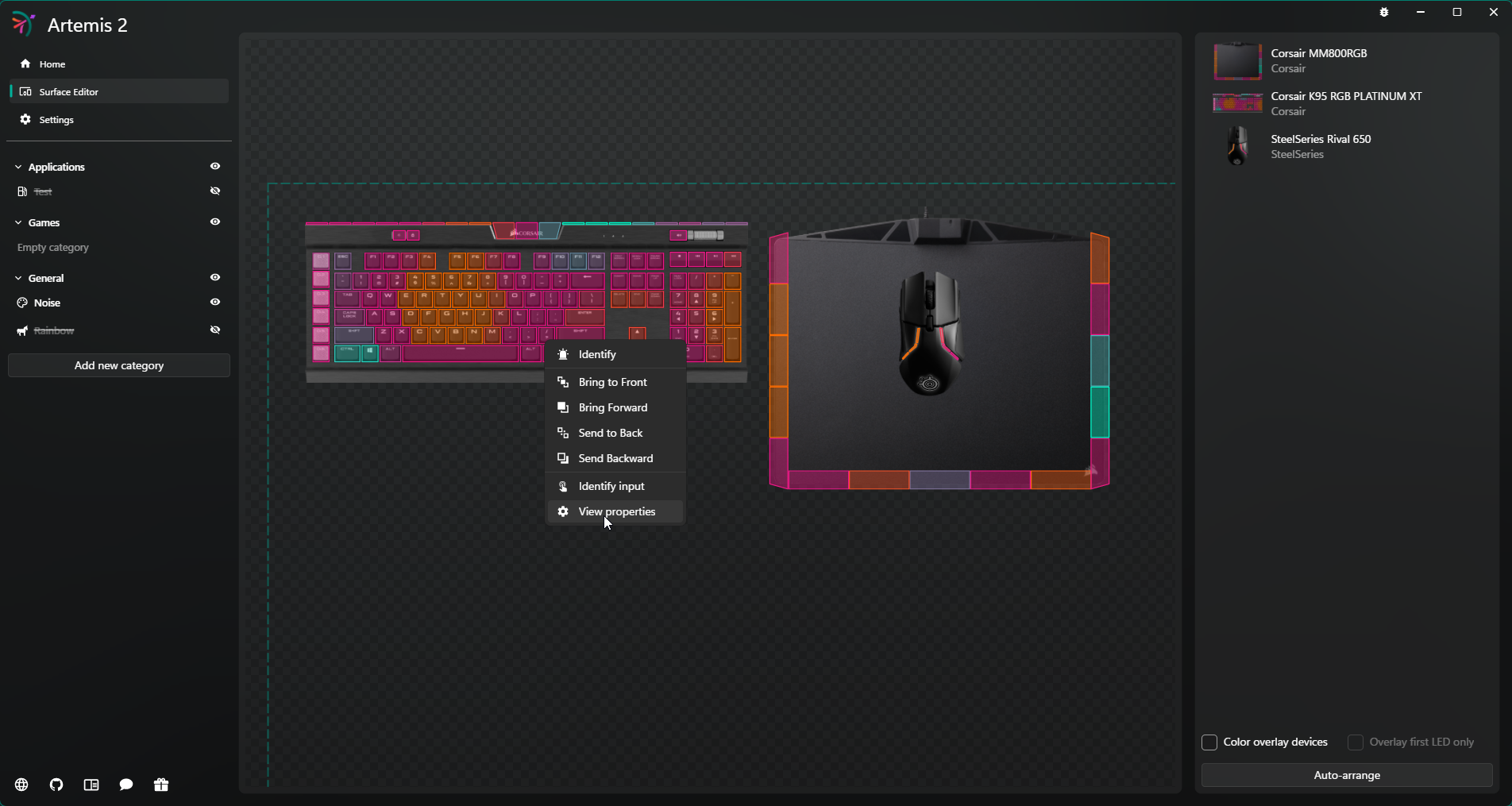 The surface editor allows you to recreate your desktop in 2D space, this provides Artemis with spatial awareness and ensures effects scale properly over your different devices. Right clicking a device lets you change its properties such as rotation and scale.
With the keyframe engine you can animate almost any property of the layer. In the example above the position and scale of the shape have been animated using keyframes.
For more screenshots check out the wiki: https://wiki.artemis-rgb.com/en/screenshots
Special thanks
Over the years several companies have supported Artemis by providing both hardware and software, thank you!

